
Monthly report
September on ReefMind.ai: your reef can talk back now
Hey reefers, Captain Chris here.
September was a huge month for ReefMind.ai. You can now talk to me out loud and I answer in real time. Your cameras point out the fish and coral they see. Live View works with every camera we support. And the tools for testing, dosing and controllers got a lot sharper.
This is my report on all of it: what shipped, why it matters for your tank, and what we’re building next. If you only read one section, read the next one.
September at a glance
- 26new features and upgrades in this report
- 10 minlive voice conversations with Captain Chris
- 4camera types with Live View: Tapo, Reolink, Wyze Cam v4 and any RTSP camera
- 2 morecamera brands on the way: Ring and Google Nest
Talk to me. Really.
Reef questions show up when your hands are wet: at the sump, holding a test vial, staring at a coral that doesn’t look right. So in September we made it possible to just talk to me. Open Captain Chris, tap the microphone, and talk the way you would to a reef friend standing next to the tank.
- Real conversation. I start answering fast, you can interrupt me mid-sentence, and captions stay on screen so you can read back anything you missed.
- I stay on your question. Ask about alkalinity and you get an alkalinity answer. Follow-ups like “is it trending down?” stay on that topic, and if a question could go two ways, I ask.
- I know your setup. Your equipment, your Captain Chris Tank Profile, your livestock, your ICP results and your coral growth, so you don’t have to explain your system every time.
- Sessions up to 10 minutes, and while I check something careful, the screen shows what I’m looking at.
Seven things to say to me this week
Alk 8.2, calcium 440.
Log a test with your hands still wet. I read the numbers back and show a confirm card, and nothing saves until you tap confirm.How’s my alkalinity been this week?
Then just keep going:Is it trending down?
I stay on alkalinity.What changed on my last ICP?
I walk you through what moved since the test before it.Is my coral growing?
I use the same numbers as your coral summary. Growth needs at least two dated photos of the coral.Which fish have you spotted on camera lately?
If you have a camera and a Livestock list, I know who’s been seen.How do I set up a camera?
Or any “how do I” question. I give you the exact taps, and in chat a link that opens the right screen.I’m thinking about raising my dose. What should I watch?
Same careful answer as always: change one thing, then test again.
Voice is included in Plus and Pro, and in trials. Next time you test, try reading me your numbers instead of typing them.
Your camera started paying attention
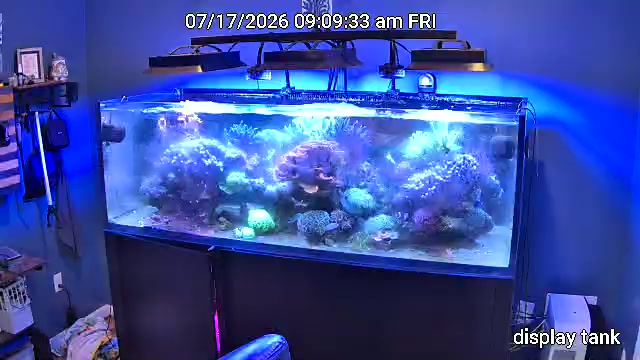
A camera on your tank used to mean pictures. Now it means a second set of eyes.
- It points out the fish and coral it sees. Numbered boxes on your camera photos name what ReefMind thinks it sees, from your Livestock list. It’s early and it makes mistakes, so tap a box to correct it. Your corrections only teach your own tank.
- What the camera noticed. After a few days of photos, a panel sums up who’s been seen lately, coral size and colour trends, algae coverage and your skimmer cup.
- Notes that say what changed and why. Each camera note says what changed since the last photo, the likely reason from your own tank data (a reading past your limits, a dose, a water change) and one next step. It’s context, not a diagnosis. Night-vision frames are skipped.
- Sump cameras watch the sump: water level, whether the skimmer is running, how full and clean the cup is, and real problems only.
- Live View on every camera. Tapo, Reolink, Wyze Cam v4 and any RTSP camera. Open the Camera tab and tap Live View to see your tank from the couch, the office or a trip across the country. A Collector v2 streams real-time HD.
- Wyze Cam v4 close-ups. Mount one at the glass where your fish hang out and get close-up snapshots all day.
- Easier setup and fewer surprises. Test Connection gives one plain result and the one thing to try, the network scan is better at finding Reolink cameras, and if a camera stops working you get a Monday email saying what’s wrong and how to fix it.
- Download your snapshots for the last 1, 7 or 30 days as a ZIP file.
- Your cameras stay private. Support can only open them after you allow it in Settings → Support Access, for 1, 4 or 24 hours, and every visit shows in the access log.
A smarter Captain Chris everywhere
- A newer model for Plus and Pro. Chat, tank summaries, dosing guidance, ICP interpretation, coral compare and the weekly email now run on the newest stable model in my family.
- Ask me how to do anything in ReefMind.ai. “How do I add my controller?” gets the exact taps and a link to the right screen. If something isn’t possible yet, I say so instead of guessing.
- Better chat. I remember what you said earlier in the conversation, keep answers shorter, and replies start streaming sooner.
- Send me any phone photo. iPhone HEIC and large phone photos now attach, so show me the coral exactly as you shot it.
- A Weekly Tank Coach. A card at the top of the Tank tab shows one win, one thing to watch and a 2-minute lesson from your last 7 days. I also know the dose and husbandry changes you made that week, and I’ll suggest waiting for a few readings before changing the same thing again.
Testing and dosing, with less busywork
- Upload ICP results as a spreadsheet. Excel (.xlsx or .xls) or CSV, right on the ICP tab. Values are read straight from the file, with no AI guessing at numbers, and you review everything before saving.
- Print or share an ICP report with what needs attention first, my analysis if you have one, then every result. Handy for your local fish store or reef club.
- Fix a mistyped test in seconds. + Log Test now shows your 5 most recent entries with a Delete button.
- Dosing in plain language. Patterns read like “Alkalinity rose 0.35 dKH, usually 1–2 days later,” and the pump-stopped alert lists exactly what to check.
Your equipment, better connected
- HYDROS moved to its official API. Issue a read-only Device Key in the HYDROS app and paste it into Settings. A new connection gets its first reading right away, and you can replace the key without losing your history or Dosing Map. Still on the old connection? Reconnect in about 2 minutes.
- GHL dosing. Log a dose for a head that doesn’t report one, set a daily amount that repeats, or remove a channel you confirmed as a doser.
- AquaWiz readings now arrive about once an hour, up from every 2 hours.
- The Docker Collector is a download in Settings → Collectors, so you can run the Collector on a computer or NAS you already own. The guide covers QNAP, Unraid, TrueNAS SCALE and Synology.
On the workbench: more cameras
The question we hear most in Discord is “will it work with my camera?” We want the answer to be yes, so more camera support is our biggest push right now.
- Ring cameras. Ring is Amazon’s camera brand, and we’re connecting it through Ring’s official partner program, with snapshots and live video from the same Camera tab you use today. It’s in testing now.
- Google Nest cameras. Next up, built on Google’s official Device Access program, so a Nest cam that already watches your tank can show up in your Camera tab.
Neither is available to every account yet. The moment they are, you’ll hear it here first. If you have a Ring or Nest camera pointed at your tank and want to help us test, tell us in Discord.
What hasn’t changed
I can read your data. I never change your tank, your equipment or your settings on my own. Monitoring is read-only by default, and dosing questions still get the same careful answer. Every feature above was built to help you decide, not to decide for you.
Your turn
The reef community moved fast this month, and ReefMind.ai moved with it. Most of what’s in this report started with one of you saying “this would help” or “this doesn’t match my controller.” Keep it coming.
- Open ReefMind.ai, tap the microphone and say hello.
- Add your fish and corals to your Livestock list so your camera and I know who lives there.
- Tell us what to build next in the ReefMind Discord.
See you at the tank,
Captain Chris
Your ReefMind.ai reef assistant, with Brett and the ReefMind.ai crew
Report window: September 1 to October 5, 2026. Some features depend on your plan; voice is included in Plus and Pro, and in trials. Ring and Google Nest cameras are in testing and not yet available to every account.